
HP ProLiant DL360 Generation 5 Server Maintenance and Service Guide

Removal and replacement procedures 30
Front bezel
1. Power down the server (on page 27).
2. Extend the server from the rack (on page 27).
3. Remove all hard drives ("Hot-plug SAS or SATA hard drives" on page 29) and hard drive blanks (on
page 28).
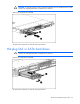
4. Remove the serial label pull tab by extending it out, and then pressing on the underside to release it
from the chassis.
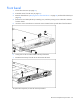
5. Use the T-10 Torx screwdriver to remove the screws located on the top and sides of the front bezel.
6. Gently push on the two tabs located at the top of the bezel
7. Rotate the bezel away from the server and remove the bezel.
To replace the component, reverse the removal procedure.