
HP ProLiant DL360 Generation 5 Server Maintenance and Service Guide

Removal and replacement procedures 29
CAUTION: To prevent improper cooling and thermal damage, do not operate the server unless
all bays are populated with either a component or a blank.
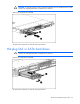
Remove the component as indicated.
To replace the component, reverse the removal procedure.
Hot-plug SAS or SATA hard drives
CAUTION: To prevent improper cooling and thermal damage, do not operate the server unless
all bays are populated with either a component or a blank.
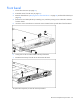
Remove the component as indicated.
To replace the component, reverse the removal procedure.