
ProLiant DL360 Generation 4p Server (SAS Model) Maintenance and Service Guide

Server component identification 47
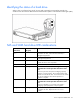
Identifying the status of a hard drive
When a drive is configured as a part of an array and connected to a powered-up controller, the
condition of the drive can be determined from the illumination pattern of the hard drive status lights (LEDs).
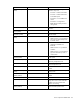
SAS and SATA hard drive LED combinations
1 - Fault/UID LED
(amber/blue)
2 - Online/Activity
LED (green)
Interpretation
Flashing amber and
blue
On, off, or flashing
The drive has failed, or a predictive failure alert has been
received for this drive; it also has been selected by a
management application.
Blue On, off, or flashing
The drive is operating normally, and it has been selected by
a management application.
Flashing amber On A predictive failure alert has been received for this drive.
Replace the drive as soon as possible.
Off On The drive is online, but it is not active currently.
Flashing amber Flashing
Do not remove the drive. Removing a drive may
terminate the current operation and cause data
loss.
The drive is part of an array that is undergoing capacity
expansion or stripe migration, but a predictive failure alert
has been received for this drive. To minimize the risk of data
loss, do not replace the drive until the expansion or
migration is complete.
Off Flashing
Do not remove the drive. Removing a drive may
terminate the current operation and cause data
loss.
The drive is rebuilding, or it is part of an array that is
undergoing capacity expansion or stripe migration.
Flashing amber Flashing
The drive is active, but a predictive failure alert has been
received for this drive. Replace the drive as soon as
possible.