
ProLiant DL360 Generation 4p Server (SAS Model) Maintenance and Service Guide

Server component identification 45
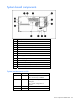
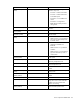
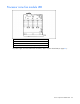
System LED and color Internal Health LED color Status
Processor failure, socket X
(amber)
Red
One or more of the following
conditions may exist:
• Processor in socket X has failed.
• Processor in socket X failed over
to the offline spare.
• Processor X is not installed in the
socket.
• Processor X is unsupported.
• ROM detects a failed processor
during POST.
Amber
Processor in socket X is in a pre-failure
condition.
Processor failure, both
sockets (amber)
Red Processor types are mismatched.
PPM failure (amber) Red PPM has failed.
DIMM failure, slot X
(amber)
Red • DIMM in slot X has failed.
• DIMM in slot X is an unsupported
type, and no valid memory exists
in another bank.
Amber
• DIMM in slot X has reached
single-bit correctable error
threshold.
• DIMM in slot X is in a pre-failure
condition.
• DIMM in slot X is an unsupported
type, but valid memory exists in
another bank.
DIMM failure, all slots in
one bank (amber)
Red
No valid or usable memory is installed
in the system.
Overtemperature (amber) Amber
The health driver has detected a
cautionary temperature level.
Red
The server has detected a hardware
critical temperature level.
Riser interlock (amber) Red
The PCI riser board assembly is not
seated.
Online spare memory
(amber)
Amber
Bank X failed over to the online spare
memory bank.
Power converter module
interlock (amber)
Red
The power converter module is not
seated.
Fan module (amber) Amber A redundant fan has failed.
Fan module (red) Red
The minimum fan requirements are not
being met in one or more of the fan
modules. One or more fans have
failed or are missing.
Power supply signal
interlock (amber)
Red
The power supply signal cable is not
connected to the system board.