
ProLiant DL360 Generation 4p Server (SAS Model) Maintenance and Service Guide

Removal and replacement procedures 26
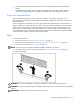
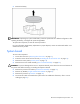
To replace a DIMM, align the DIMM with the slot and insert the DIMM firmly. When fully seated, the
DIMM slot latches lock into place.
Processor
To remove a processor:
1. Power down the server ("Powering down the server" on page 11).
2. Extend the server from the rack, if applicable ("Extending the server from the rack" on page 12).
3. Remove the access panel ("Access panel" on page 14).
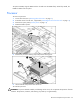
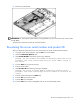
4. Rotate the baffle upward.
5. Release the processor retaining clips and processor locking lever.
6. Lift the heatsink and processor from the server.
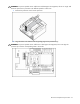
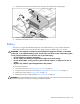
To install the processor:
CAUTION: To prevent thermal instability and damage to the server, do not separate the processor from the
heatsink. The processor, heatsink, and retaining clip make up a single assembly.