
ProLiant DL360 Generation 4p Server (SAS Model) Maintenance and Service Guide

Removal and replacement procedures 25
•
All DIMMs installed must be the same speed. Do not install DIMM modules supporting different
speeds.
• Install DIMMs into both slots within a single bank. DIMMs must be installed in order. Upgrade
memory by installing DIMM pairs into banks in sequential bank order, starting with bank B.
Single- and dual-rank DIMMs
PC2-3200 DIMMs can either be single- or dual-rank. While it is not normally important for you to
differentiate between these two types of DIMMs, certain DIMM configuration requirements are based on
these classifications.
Certain configuration requirements exist with single- and dual-rank DIMMs that allow the architecture to
optimize performance. A dual-rank DIMM is similar to having two separate DIMMs on the same module.
Although only a single DIMM module, a dual-rank DIMM acts as if it were two separate DIMMs. The
primary reason for the existence of dual-rank DIMMs is to provide the largest capacity DIMM given the
current DIMM technology. If the maximum DIMM technology allows for creating 2-GB single-rank DIMMs,
a dual-rank DIMM using the same technology would be 4-GB.
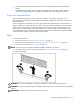
DIMM
To remove the component:
1. Power down the server ("Powering down the server" on page 11).
2. Extend or remove the server from the rack ("Extending the server from the rack" on page 12).
3. Remove the access panel ("Access panel" on page 14).
NOTE: The server ships with at least two DIMMs installed in DIMM slots 1A and 2A.
4. If necessary, remove the PCI riser board assembly ("PCI riser board assembly" on page 20).
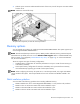
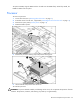
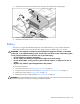
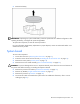
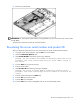
5. Remove the DIMM.
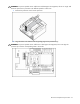
CAUTION: Be sure to install DIMMs in the proper configuration. Refer to the Documentation CD.
CAUTION: Use only Compaq branded or HP DIMMs. DIMMs from other sources may adversely affect data
integrity.
IMPORTANT: DIMMs do not seat fully if turned the wrong way.