
ProLiant DL360 Generation 4p Server (SAS Model) Maintenance and Service Guide

Removal and replacement procedures 19
CAUTION: When replacing the component, be sure the power converter module is properly seated in the
server chassis.
To replace the component, reverse the removal procedure.
Processor fan assembly
CAUTION: Do not operate the server for long periods with the access panel open or removed. Operating
the server in this manner results in improper airflow and improper cooling that can lead to thermal damage.
To remove the component:
1. Extend or remove the server from the rack ("Extending the server from the rack" on page 12).
2. Remove the access panel ("Access panel" on page 14).
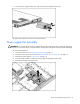
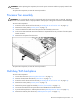
3. Loosen the thumbscrew that secures the processor fan assembly to the server.
4. Push on the sheet metal tab near the thumbscrew to separate the fan tray connector from the system
board connector.
5. Remove the component from the server.
To replace the component, reverse the removal procedure.
Multi-bay/SAS backplane
To remove the component:
1. Power down the server ("Powering down the server" on page 11).
2. Remove all SAS/SATA hard drives ("Hard drive" on page 15).
3. Extend or remove the server from the rack ("Extending the server from the rack" on page 12).
4. Remove the access panel ("Access panel" on page 14).
5. Remove the power supply fan module ("Processor fan assembly" on page 19).
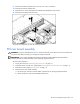
6. Disconnect the cable from the optical device and diskette drive interface board.
7. Eject the multi-bay device or multi-bay device blank ("Multi-bay blank or device" on page 15).
8. Remove the multi-bay from the server ("Multi-bay device ejector" on page 17).