
ProLiant DL360 Generation 4p Server (SAS Model) Maintenance and Service Guide

Removal and replacement procedures 16
3.
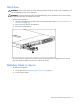
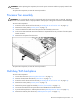
Remove the multi-bay blank.
To replace the component, reverse the removal procedure.
DVD/CD-ROM/diskette drive
To remove the component:
1. Power down the server ("Powering down the server" on page 11).
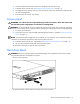
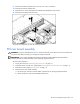
IMPORTANT: The ejector button is recessed to prevent accidental ejection; it may be helpful to use a pen
or similar shaped object to access the button.
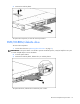
2. Press the ejector button.
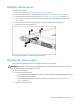
3. Remove the multi-bay blank, diskette drive, or multi-bay device.
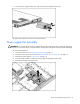
To replace the drive, slide the drive into the bay until it clicks.