
HP ProLiant DL360 Generation 4p Server Maintenance and Service Guide

Removal and replacement procedures 30
DIMM installation guidelines
You must observe the following guidelines when installing additional memory:
• DIMMs installed in the server must be Registered DDR2 DRAM, 2.5 volts, 64 bits wide, and ECC.
• DIMMs in slots 1A and 2A must match and must be installed as a pair.
• DIMMs in slots 3B and 4B must match and must be installed as a pair.
• DIMMs in slots 5C and 6C must match and must be installed as a pair.
• All DIMMs installed must be the same speed. Do not install DIMM modules supporting different
speeds.
• Install DIMMs into both slots within a single bank. DIMMs must be installed in order. Upgrade
memory by installing DIMM pairs into banks in sequential bank order, starting with bank B.
DIMM
1. Power down the server (on page 12).
2. Extend or remove the server from the rack ("Extending the server from the rack" on page 12).
3. Remove the access panel ("Access panel" on page 14).
NOTE: The server ships with at least two DIMMs installed in DIMM slots 1A and 2A.
4. If necessary, remove the PCI Riser Board Assembly ("PCI riser board assembly" on page 24).
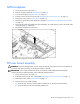
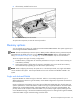
5. Remove the DIMM.
CAUTION: Be sure to install DIMMs in the proper configuration. Refer to the Documentation CD.
CAUTION: Use only Compaq branded or HP DIMMs. DIMMs from other sources may adversely affect data
integrity.
IMPORTANT: DIMMs do not seat fully if turned the wrong way.
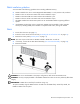
To replace a DIMM, align the DIMM with the slot and insert the DIMM firmly. When fully seated, the
DIMM slot latches lock into place.