
HP ProLiant DL360 Generation 4p Server Maintenance and Service Guide

Removal and replacement procedures 27
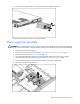
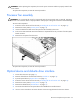
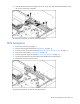
To replace the component, reverse the removal procedure.
Power converter module
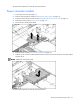
1. Power down the server (on page 12).
2. Remove all hot-plug power supplies ("Hot-plug AC power supply" on page 20).
3. Extend or remove the server from the rack ("Extending the server from the rack" on page 12).
4. Remove the access panel ("Access panel" on page 14).
5. Disconnect all internal power cables.
6. Remove the fan module ("Processor fan assembly" on page 22).
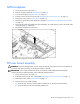
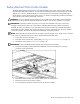
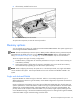
7. Slide the power converter module toward the back of the server, then lift the power converter module
from the server.
NOTE: Cables are removed for clarity.
To replace the component, reverse the removal procedure.