
ProLiant Server High-Density Deployment Server Solution

In-Rack Local Consoles
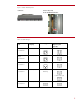
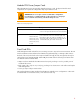
With an in-rack local console, all equipment, servers, switchboxes, keyboards, keyboard drawers,
and video displays are installed in the same rack. The HP switchboxes mount behind the keyboard
drawer and do not consume extra panel space in the rack. Using the TFT5600 RKM and an IP
console switch will consume a total of 1U to accommodate up to 128 servers. One console switchbox
can support up to 16 directly attached servers with no user blocking. Up to eight servers may be
tiered or cascaded on each switch port using either a legacy Compaq KVM switch or an Expansion
Module. Only one user can access tiered switches or servers connected by Expansion Modules at any
one time, however. Critical devices requiring frequent access should be attached directly to a switch
port. Server accessibility should be assessed by the IT manager before deployment to determine the
appropriate server density per console switch.
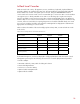
Table 5 outlines the number of devices that fully populate a 47U, 42U, or 36U rack with an in-rack
local console.
Table 5. Device Configuration for an In-Rack Local IP Console
Device or Cable 47U Rack 42U Rack 36U Rack
HP ProLiant DL360/320 G4 servers 46 41 35
KVM IP Console Switches 1 1 1
Interface adapters 46 41 35
UTP CAT5 cables for KVM access 46 41 35
Expansion modules 4-16 3-16 3-16
TFT5600 RKM (integrated
monitor/keyboard)
1 1 1
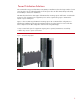
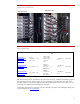
As illustrated in Figure 5, each server deployed in a fully populated rack with an in-rack IP console
management system requires the following accessories for successful deployment and operation:
• Interface adapter
• UTP CAT5 cable 6-ft (1.8-m) cables for sliding rail solutions
• Universal Sliding Rack Rail
• Velcro ties to secure the cabling
• Optional cable management arm
• Optional fixed cord PDU
10