
ProLiant DL360 G4 and G4p Server High Density Deployment Solution White Paper

31
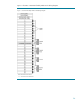
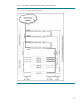
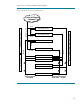
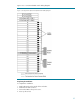
Figure 15 is a conventional KVM switch cabling diagram.
Figure 15. Configuration C (Conventional) KVM Switch Cabling Diagram
Completing the Installation
To complete the installation:
1. Install side panels on the outside of the end racks.
2. Install the front and rear doors.
3. Connect the PDUs to the power source.
4. Power up the servers.