
ProLiant DL360 Generation 2 Server Maintenance and Service Guide

Connectors, Switches, Security Override Jumper and Status LED Indicators
Compaq ProLiant DL360 Generation 2 Server Maintenance and Service Guide 5-17
COMPAQ CONFIDENTIAL Codename: Maisto Part Number: 233831-001 Last Saved On: 12/12/01 10:24 AM
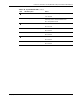
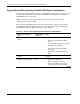
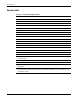
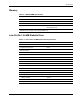
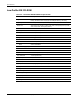
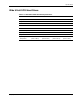
Table 5-11: System LEDs and Internal Health LED Status Combinations continued
System Board LED and
Color
Internal Health
LED Color
Status
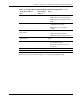
DIMM failure, slot X (Amber) Red
• DIMM in slot X has failed.
• DIMM in slot X is an unsupported type.
• DIMM in slot X has experienced a multi-
bit error.
DIMM failure, slot X (Amber) Amber
• DIMM in slot X has reached single-bit
correctable error threshold.
• DIMM in slot X is in a pre-failure
condition.
DIMM failure, all slots in one
bank (Amber)
Red Interleaving error:
• DIMM is missing from the bank.
• DIMMs are mismatched within the bank.
DIMM failure, all slots in all
banks (Amber)
Red No valid or usable memory is installed in the
system.
Over-temperature (Amber) Red
• System has reached the operating
system cautionary level.
• System has exceeded the hardware
critical level.
Riser (Amber) Red PCI riser is unseated.
Fan (Amber) Red A CPU or Power Supply fan has failed.
For more detailed server health information, use Compaq Insight Manager XE.