
ProLiant DL360 Generation 2 Server Maintenance and Service Guide

Compaq ProLiant DL360 Generation 2 Server Maintenance and Service Guide 4-1
COMPAQ CONFIDENTIAL Codename: Maisto Part Number: 233831-001 Last Saved On: 11/19/01 9:10 AM
4
Diagnostic Tools
This chapter provides an overview of the diagnostic and management tools available for the
Compaq Proliant DL360 Generation 2 server. For more detailed information and procedures
refer to the Compaq Server Troubleshooting Guide on the Server Documentation CD.
Diagnostic Tools Overview
The following tools are available to diagnose problems, test hardware, and monitor and
manage server operations.
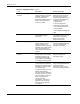
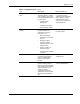
Table 4-1: Diagnostic Tools
Tool Description How to run the tool
Array Diagnostics Utility (ADU) A Windows-based tool
designed to run on all Compaq
systems that support Compaq
array controllers. Two main
functions of ADU are to collect
all possible information about
the array controllers in the
system, and generate a list of
detected problems.
Run ADU from the SmartStart
CD.
For a complete list of ADU
error messages, refer to the
Compaq Servers
Troubleshooting Guide.
Automatic Server Recovery
(ASR)
ASR automatically restarts the
server after a catastrophic
operating system failure.
• Available Recovery –
software error recovery
and environmental
recovery
• Unattended Recovery –
logs the error information
to the IML, resets the
server and tries to restart
the operating system
Run RBSU and set ASR to
‘Enable’
continued