
ProLiant DL360 Generation 2 Server Maintenance and Service Guide

Removal and Replacement Procedures
2-16 Compaq ProLiant DL360 Generation 2 Server Maintenance and Service Guide
COMPAQ CONFIDENTIAL Codename: Maisto Part Number: 233831-001 Last Saved On: 12/12/01 3:47 PM
SCSI Backplane
To remove the SCSI backplane:
1. Power down the server. See “Powering Down the Server” earlier in this chapter.
2. Remove the server from the rack. See “Removing the Server from the Rack” in this
chapter.
3. Remove the access panel. See “Server Access Panel” in this chapter.
4. Remove the hot-plug SCSI hard drives. See “Hot-Plug SCSI Hard Drives” earlier in this
chapter.
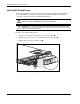
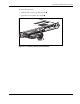
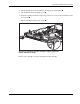
5. Loosen the system board thumbscrew
and remove the thumbscrew assembly that
secures the SCSI backplane to the system board.
1
2
Figure 2-12: Removing the system board thumbscrew assembly