
ProLiant DL360 G2 Server High-Density Deployment


ProLiant DL360 G2 Server High-Density Deployment 18
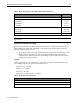
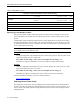
Table 11 lists options for configuring console management systems.
Table 11. Local Console Management Options
Product Name Compaq
Part No.
Description
Server Console Switch 1 x 8-
port (100-230 V AC)
400337-001 N.A.
TFT5600 Rack-Mount
Keyboard and Monitor
221546-001 1U integrated keyboard and monitor.
TFT5010R Flat Panel Monitor 217248-XXX 2U rack-optimized monitor (Keyboard not included).
1U Keyboard with Hot Keys
and Trackball
158649-XXX 1U Form Factor
CPU-to-Switchbox Cable
110936-B25
1
Note 1: Use 6-ft cables for sliding rails.
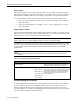
In-Rack Local Consoles
With an in-rack local console, all equipment, servers, switchboxes, keyboards, keyboard drawers,
and video displays are installed together in the same rack. One console switchbox can support up
to eight pieces of equipment.
Each server deployed in a fully populated rack with an in-rack local console management system
requires the following accessories for successful deployment and operation:
• KVM server to console cables [1.8 m (6 ft) cables for sliding rail solutions].
• Universal Rack Rail (the quick deploy rail kit that ships standard with the server and comes
with a cable management solution), or the option Sliding Rail Kit (with cable management
solution), or optional telco rack solution.
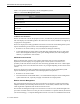
Off-Rack Local Consoles
When an off-rack local console is used, certain components such as console switchboxes,
keyboards, and video displays do not populate space in the rack, but are located in close
proximity to the rack. Because of this, the rack can be fully populated with servers. Cable lengths
for connecting servers to an off-rack local console vary in length depending on the location of the
console.
Each server deployed in a fully populated rack with an off-rack console management system
requires the following accessories for successful deployment and operation:
• KVM server to console cables.
• Given the thickness of the KVM cables, it is recommended to keep the console management
system within the rack, especially in highly concentrated server deployments.
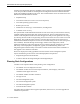
Remote Console Management
The new Integrated Lights-Out (iLO), the next generation of Compaq’s Lights-Out technology,
simplifies the life-cycle ownership of ProLiant servers. In the future, customers will receive the
robust Lights-Out capabilities built into more ProLiant servers.
ILO includes an intelligent microprocessor and can be accessed via a new, dedicated Lights-Out
port on the rear bezel of the server. This port can be connected to a corporate intranet, the Internet
(via VPN technology), or a separate management network. Accessed via a standard browser from
1713-0702A-WWEN