
Compaq ProLiant DL360 Generation 2 Server Setup and Installation Guide


4-12 Compaq ProLiant DL360 Generation 2 Server Setup and Installation Guide
Compaq Confidential – Need to Know Required
Writer: Ed Giblin Project: Compaq ProLiant DL360 Generation 2 Server Setup and Installation Guide Comments:
Part Number: 233832-001 File Name: e-ch4 Server Installation.doc Last Saved On: 8/31/01 11:42 AM
Securing the Cables in the
Fixed Cable Tray
After attaching the fixed cable tray and connecting the power cord and
peripheral devices, all cabling must be secured.
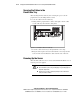
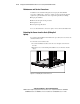
To secure the cables in the fixed cable tray:
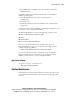
1. Starting with the peripheral device cables on the right, route the cables
over the cable tray and around the cable guides.
Figure 4-11. Securing the cables to the cable tray
2. Secure the cables onto the tray at the right with the velcro strap.
3. Bring the cables together and secure them with the velcro strap attached
to the end of the rack rail. Route the cables down the side of the rack.
Powering Up the Server
After the all the cables have been connected the ProLiant DL360 G2 server is
ready for power to be applied.
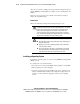
WARNING: To reduce the risk of electric shock or damage to the equipment:
■ Do not disable the power cord-grounding plug. The grounding plug is an
important safety feature.
■ Plug the power cord into a grounded (earthed) electrical outlet that is
easily accessible at all times.