
Compaq ProLiant DL360 Generation 2 Server Setup and Installation Guide



Installing Hardware Options 3-33
Compaq Confidential – Need to Know Required
Writer: Ed Giblin Project: Compaq ProLiant DL360 Generation 2 Server Setup and Installation Guide Comments:
Part Number: 233832-001 File Name: d-ch3 Installing Hardware Options.doc Last Saved On: 8/31/01 11:44 AM
2
1
3
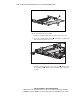
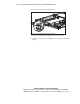
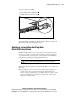
Figure 3-30. Removing the floppy disk drive
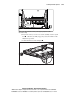
5. Push the floppy drive from the rear to release it from the backplane
connector
and pull the drive forward out of the chassis .
CAUTION: Do not operate the server without a floppy disk drive installed.
Improper cooling may damage the system.
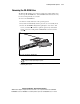
6. Replace the floppy disk drive, see “Installing the Floppy Disk Drive”
following this section.