
Compaq ProLiant DL360 Generation 2 Server Setup and Installation Guide


Installing Hardware Options 3-21
Compaq Confidential – Need to Know Required
Writer: Ed Giblin Project: Compaq ProLiant DL360 Generation 2 Server Setup and Installation Guide Comments:
Part Number: 233832-001 File Name: d-ch3 Installing Hardware Options.doc Last Saved On: 8/31/01 11:44 AM
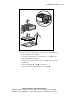
IMPORTANT: DIMMs do not seat if turned the wrong way.
2
2
1
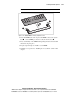
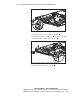
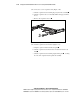
Figure 3-15. Aligning DIMM in a memory expansion socket
6. Insert the DIMM at the same angle as the DIMM socket on the system
board
. As the DIMM goes into the socket, the latches close .
7. Press down firmly on the DIMM while pushing the latches inward until
the latches snap into place.
8. Repeat steps 4 through 7 to install a second DIMM
9. Install the access panel. See “Installing the Access Panel” earlier in this
chapter.