
Compaq ProLiant DL360 Generation 2 Server Setup and Installation Guide

3-4 Compaq ProLiant DL360 Generation 2 Server Setup and Installation Guide
Compaq Confidential – Need to Know Required
Writer: Ed Giblin Project: Compaq ProLiant DL360 Generation 2 Server Setup and Installation Guide Comments:
Part Number: 233832-001 File Name: d-ch3 Installing Hardware Options.doc Last Saved On: 8/31/01 11:44 AM
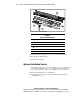
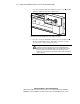
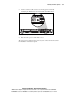
3. Press the front Unit Identification (UID) switch on the server . An LED
illuminates within the front and rear UID switches.
1
2
Figure 3-1. Activating the Front Unit Identification switch on the front panel
and setting the Power On/Standby switch to the standby power mode
4. Press the server Power On/Standby switch to place it in standby mode .
The Power LED within the Power On/Standby switch turns to amber
when the server activates standby power mode.
WARNING: The system power in the ProLiant DL360 G2 server is not
completely shut off by pressing the front panel Power On/Standby switch.
Placing the server Power On/Standby switch in the standby position removes
power from most areas of the server; this process may take 30 seconds.
Portions of the power supply and some internal circuitry remain active until AC
power is removed.