
Compaq ProLiant DL360 Generation 2 Server Setup and Installation Guide

E-2 Compaq ProLiant DL360 Generation 2 Server Setup and Installation Guide
Compaq Confidential – Need to Know Required
Writer: Ed Giblin Project: Compaq ProLiant DL360 Generation 2 Server Setup and Installation Guide Comments:
Part Number: 233832-001 File Name: p-appe Installing a New Battery.doc Last Saved On: 8/3/01 2:21 PM
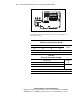
3. Locate the battery holder between the power supply connector and the
SCSI back-plane connector on the system board.
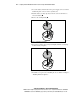
4. Push the battery security clip away from the center of the holder to
release the battery
.
5. Remove the existing battery
.
1
2
Figure E-1. Removing the old battery
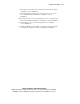
6. Insert the new battery by pressing down lightly until the security clip
locks the battery into place.
Figure E-2. Installing the new battery
7. Install the access panel. See “Installing the Access Panel” in Chapter 3,
“Installing Hardware Options.”