
Compaq ProLiant DL360 Generation 2 Server Setup and Installation Guide

Compaq Confidential – Need to Know Required
Writer: Ed Giblin Project: Compaq ProLiant DL360 Generation 2 Server Setup and Installation Guide Comments:
Part Number: 233832-001 File Name: p-appe Installing a New Battery.doc Last Saved On: 8/3/01 2:21 PM
Appendix E
Installing a New Battery
The Compaq ProLiant DL360 G2 server has one memory device that requires
a battery for retaining stored information.
System Board Battery Replacement
When the server no longer automatically displays the correct date and time,
replace the battery that provides power to the real-time clock. Under normal
use, battery life is usually about 5 to 10 years. Use a CR2032 lithium battery,
Compaq P/N 179322-001.
WARNING: To reduce the risk of electric shock or damage to the equipment:
■ Do not disable the power cord grounding plug. The grounding plug is an
important safety feature.
■ Plug the power cord into a grounded (earthed) electrical outlet that is
easily accessible at all times.
■ Disconnect power from the server or other product by unplugging the
power cord from either the electrical outlet or the server or other product.
To install a new battery:
1. If the server is on, place it in standby mode. For detailed instructions on
preparing the server for installation or upgrade, see Chapter 3,
“Installing Hardware Options.”
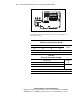
2. Remove the access panel. See “Removing the Access Panel” in
Chapter 3, “Installing Hardware Options.”