
Compaq ProLiant DL360 Generation 2 Server Setup and Installation Guide


10-4 Compaq ProLiant DL360 Generation 2 Server Setup and Installation Guide
Compaq Confidential – Need to Know Required
Writer: Ed Giblin Project: Compaq ProLiant DL360 Generation 2 Server Setup and Installation Guide Comments:
Part Number: 233832-001 File Name: k-ch10 Troubleshooting.doc Last Saved On: 8/20/01 12:24 PM
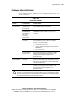
Diagnosis Steps
If a server will not power up, or powers up but does not complete the Power-
On Self-Test (POST), answer the questions in the following table to determine
appropriate actions for the symptoms observed. Based on the answers to these
questions, direction will be given to one of a series of tables, immediately
following. Based on the answers to these questions, the tables outline possible
reasons for the problem, options available to assist in diagnosis, possible
solutions available, and references to other sources of information.
By opening the access panel of a ProLiant DL360 G2 server, Compaq assumes
the user is qualified in the servicing of computer equipment and trained in
recognizing risks in products with hazardous energy levels. Otherwise, contact
your Compaq authorized service provider for support.
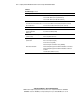
Table 10-2
Diagnosis Steps
Question Action
Did the Power On/Standby LED on the front
panel turn on?
See Table 10-3.
Is video available for diagnosis? See Table 10-4.