
HP ProLiant DL320s Server User Guide

Hardware options installation 44
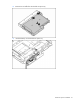
14. Replace the air baffle on the hard drive option tray.
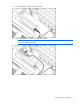
15. Place the hard drive option tray in the server, and tighten the thumbscrews.
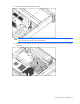
16. Replace the system fans.
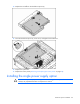
17. Replace the access panel ("Removing and replacing the access panel" on page 26).
Installing the single power supply option
CAUTION: To prevent improper cooling and thermal damage, do not operate the server unless
all bays are populated with either a component or a blank.