
HP ProLiant DL320s Server User Guide

Operations 28
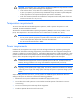
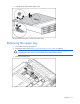
4. Loosen the thumbscrews, and lift the upper tray from the server.
Removing the PCI riser board assembly
CAUTION: To prevent damage to the server or expansion boards, power down the server and
remove all AC power cords before removing or installing the PCI riser board assembly.
1. Power down the server (on page 26).
2. Remove the access panel ("Removing and replacing the access panel" on page 26).
3. Remove the upper tray ("Removing the upper tray" on page 27).
4. Disconnect any internal or external cables that are connected to any existing expansion boards.
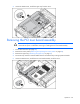
5. Loosen the thumbscrews, and lift the PCI riser board assembly out of the server.