
HP Proliant DL320e Gen8 Carrier-Grade Server Read Before Install Carrier-Grade Instructions.




Verifying the System Maintenance Switch Setting
switch the setting, you must verify that position #10 on the system maintenance switch is in the ON
position.
NOTE: Use HP Integrity iLO4 to verify that the thresholds are correct’. For complete information
and instructions on using iLO4, see the HP iLO 4 User Guide at the following HP website:
http://www.hp.com/go/ilo/docs
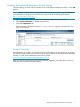
1. Log in to iLO4. For instructions, see the HP Integrated Lights-Out 4 User Guide.
2. Select System Information on the left navigation bar.
3. Select the Temperatures tab.
If the temperature thresholds of sensor 01–Inlet Ambient appear as shown below, the
switch is set correctly.
Incorrect Thresholds
If the thresholds do not show up correctly, ensure the #10 position was set correctly. If incorrectly
set, reset the system maintenance switch SW2 to the factory defaults as described in the HP Proliant
DL320e v2 Gen8 Server Maintenance and Service Guide:
http://www.hp.com/support/DL320eGen8v2_MSG_en
After you reset the switch settings to the factory defaults, repeat the procedure above on how to
verify the system maintenance switch setting.
Verifying the System Maintenance Switch Setting 7