
ProLiant DL320 Setup and Installation Guide

Installing the Server 4-9
Compaq Confidential – Need to Know Required
Writer: Gilbert Saldivar Project: Compaq ProLiant DL320 Setup and Installation Guide Comments:
Part Number: 203836-001 File Name: e-ch4 Installing the Server.doc Last Saved On: 8/23/00 4:07 PM
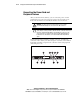
Installing the Cable Support Bracket on the Server
The Cable Support Bracket enables the ProLiant DL320 server to use the rack
management solutions available for the ProLiant DL360.
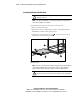
Use the following procedure to attach the Cable Support Bracket.
1. Remove the access panel. See “Removing the Access Panel” in
Chapter 3, “Installing Hardware Options.”
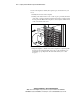
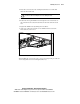
2. Insert the alignment tab into the alignment slot above the left corner
of the server rear panel.
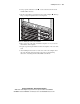
3. Tighten the thumbscrews to secure the cable support bracket to the
server rear panel.
1
2
1
Figure 4-7. Installing the cable support bracket
4. Install the access panel. See “Installing the Access Panel” in Chapter 3,
“Installing Hardware Options.”