
ProLiant DL320 Setup and Installation Guide

4-8 Compaq ProLiant DL320 Setup and Installation Guide
Compaq Confidential – Need to Know Required
Writer: Gilbert Saldivar Project: Compaq ProLiant DL320 Setup and Installation Guide Comments:
Part Number: 203836-001 File Name: e-ch4 Installing the Server.doc Last Saved On: 8/23/00 4:07 PM
Attaching the Fixed Cable Tray
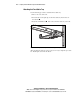
Use the following procedure to attach the fixed cable tray:
1. Move to the rear of the rack.
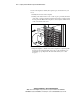
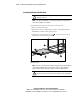
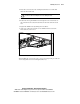
2. Insert the tabs on the right edge of the fixed cable tray into the slots on
the rack rail
.
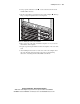
3. Fasten the rail thumbscrew that secures the fixed cable tray to the rail.
1
2
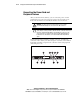
Figure 4-6. Inserting and attaching the fixed cable tray (rear view)
After attaching the cable tray to the rack, you are ready to begin the procedure
for “Inserting the Server Into the Rack.”