
ProLiant DL320 Setup and Installation Guide

Installing the Server 4-7
Compaq Confidential – Need to Know Required
Writer: Gilbert Saldivar Project: Compaq ProLiant DL320 Setup and Installation Guide Comments:
Part Number: 203836-001 File Name: e-ch4 Installing the Server.doc Last Saved On: 8/23/00 4:07 PM
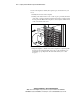
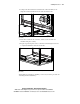
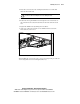
6. Compress the fixed rail rack toward the front of the rack until you can
align the rear tabs with the inner holes at the back of the rack.
Figure 4-4. Aligning the rear tabs of the fixed rack rail with the rear holes
(rear view)
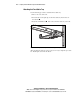
7. Insert the rear tabs into the rear holes, and release the rail. The rail
should lock in place securely.
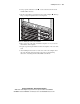
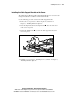
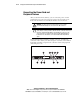
8. Repeat steps 2 through 7 for the second fixed rack rail. Figure 4-5 shows
a completed installation of the fixed rack rails.
Figure 4-5. Fixed rack rails installed in the rack, ready for server installation
(rear view)
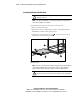
After both fixed rack rails are installed, you are ready to use the procedure for
“Attaching the Fixed Cable Tray.”