
ProLiant DL320 Setup and Installation Guide

4-4 Compaq ProLiant DL320 Setup and Installation Guide
Compaq Confidential – Need to Know Required
Writer: Gilbert Saldivar Project: Compaq ProLiant DL320 Setup and Installation Guide Comments:
Part Number: 203836-001 File Name: e-ch4 Installing the Server.doc Last Saved On: 8/23/00 4:07 PM
Use the rack template to identify the required space and location for your
server:
1. Identify the front side of the template.
2. Starting at the bottom of the rack, or at the top of a previously mounted
component, secure the template against the front of the rack by pressing
the two push tabs. Match the hole pattern on the template with the holes
on the vertical rails of the rack.
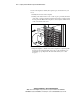
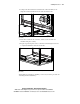
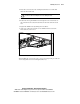
Figure 4-1. Measuring with the template
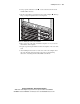
3. Align the template so that the sides of the template are squared up with
the sides of the rack. Tick marks on the rack’s vertical rails help you
maintain the proper alignment. The tick marks allow you to count
U-spaces.