
ProLiant DL320 Setup and Installation Guide

Installing Hardware Options 3-51
Compaq Confidential – Need to Know Required
Writer: Gilbert Saldivar Project: Compaq ProLiant DL320 Setup and Installation Guide Comments:
Part Number: 203836-001 File Name: d-ch3 Installing Hardware Options.doc Last Saved On: 8/23/00 4:00 PM
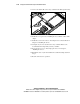
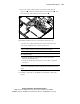
a. Lay the PCI riser board assembly in the chassis, and ensure that the
system power cable is clear of the PCI riser board assembly
thumbscrew plate.
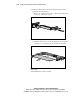
b. Align the tabs along the lower rear corners of the PCI riser board
assembly with the retainers
on the rear panel of the chassis.
1
2
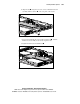
Figure 3-46. Aligning the rear edge of the PCI riser board assembly with the
chassis
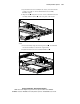
c. Press down firmly along the 64-bit expansion slot until the PCI
riser board assembly is seated in the expansion slot.
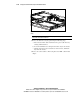
d. Tighten the PCI riser board assembly thumbscrew .
1
2
Figure 3-47. Installing the PCI riser board assembly