
ProLiant DL320 Setup and Installation Guide

Installing Hardware Options 3-49
Compaq Confidential – Need to Know Required
Writer: Gilbert Saldivar Project: Compaq ProLiant DL320 Setup and Installation Guide Comments:
Part Number: 203836-001 File Name: d-ch3 Installing Hardware Options.doc Last Saved On: 8/23/00 4:00 PM
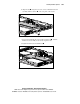
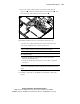
9. Remove the ATA module from the system board by unlocking the
support posts
, lifting the ATA module from the system board , and
disconnecting the ATA cables from any hard drives
.
2
3
3
1
1
Figure 3-43. Removing the ATA module from the system board
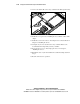
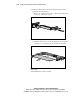
10. Install the SCSI hard drives by performing the following steps:
a. Remove any existing ATA hard drives from the hard drive trays.
b. Secure the SCSI hard drives in the hard drive trays.
IMPORTANT: Ensure that you install your hard drives with the data and power
connectors along the bottom of the tray, facing away from the front grill.
IMPORTANT: The Phillips screws for this operation are shipped along the top edge of the
PCI riser board assembly.
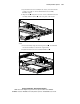
c. Install the trays into the hard drive bays, and secure them by
tightening their thumbscrews.
d. Connect the SCSI cable and hard drive power cable to your SCSI
hard drives.
IMPORTANT: When connecting the power cable to your hard drives, ensure that the
connectors are installed with the red wires facing right (as viewed from the front of the
server).
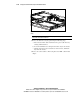
11. Lay the SCSI cable flat across the center wall area of the chassis.
12. Install the center wall. See “Installing the Center Wall” earlier in this
chapter.