
ProLiant DL320 Setup and Installation Guide

Installing Hardware Options 3-41
Compaq Confidential – Need to Know Required
Writer: Gilbert Saldivar Project: Compaq ProLiant DL320 Setup and Installation Guide Comments:
Part Number: 203836-001 File Name: d-ch3 Installing Hardware Options.doc Last Saved On: 8/23/00 4:00 PM
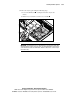
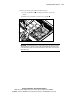
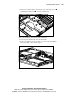
9. Install the hard drive tray into the chassis and secure it by tightening
its thumbscrew
.
1
2
Figure 3-34. Installing a hard drive tray into the chassis
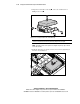
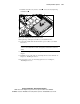
10. Repeat Steps 7 through 9 to install a second SCSI hard drive.
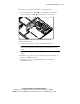
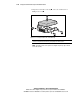
11. Connect the SCSI cable and the hard drive power cable to your SCSI
hard drives.
IMPORTANT: When connecting the power cable to your hard drives, ensure that the
connectors are installed with the red wire facing right (as viewed from the front of the
server).
12. Install the access panel. See “Installing the Access Panel” earlier in this
chapter.
13. Install the server in the rack. See “Inserting the Server into the Rack” in
Chapter 4, “Installing the Server.”
14. Power up the server. See “Powering up the Server” in Chapter 4,
“Installing the Server.”