
ProLiant DL320 Setup and Installation Guide

Installing Hardware Options 3-35
Compaq Confidential – Need to Know Required
Writer: Gilbert Saldivar Project: Compaq ProLiant DL320 Setup and Installation Guide Comments:
Part Number: 203836-001 File Name: d-ch3 Installing Hardware Options.doc Last Saved On: 8/23/00 4:00 PM
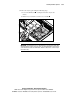
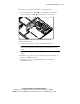
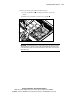
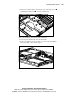
7. Remove the tray by performing the following steps:
a. Loosen the thumbscrew securing the hard drive trays to the
chassis.
b. Slide the tray toward the rear of the server and lift .
1
2
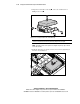
Figure 3-28. Removing the hard drive tray for ATA Device 0
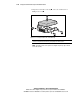
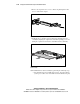
IMPORTANT: ProLiant DL320 servers for ATA hard drive users ship with the ATA cables
already installed. The module ends of the cables are threaded through the opening in the
center wall and connected to the ATA module, while the cables’ device connectors lay in
the hard drive bay.