
ProLiant DL320 Setup and Installation Guide

3-28 Compaq ProLiant DL320 Setup and Installation Guide
Compaq Confidential – Need to Know Required
Writer: Gilbert Saldivar Project: Compaq ProLiant DL320 Setup and Installation Guide Comments:
Part Number: 203836-001 File Name: d-ch3 Installing Hardware Options.doc Last Saved On: 8/23/00 4:00 PM
Installing a CD-ROM/Diskette Drive
Assembly (Optional)
You can install an optional CD-ROM/diskette drive assembly, consisting of a
low-profile diskette drive and a low-profile CD-ROM drive combined into one
unit. This assembly can be removed for use in another ProLiant DL320 server
or to prevent unwanted software installation.
CAUTION: Do not operate the server without a bezel blank or CD-ROM/diskette
drive assembly installed. Improper cooling can damage the system.
Use the following procedures to install the CD-ROM/diskette drive assembly:
1. Power down the server. See “Powering Down the Server” earlier in this
chapter.
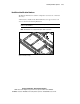
2. Locate the shipping/ejector key.
G If the shipping/ejector key is located in the ejector port, proceed to
Step 3.
G If the shipping/ejector key is located in its storage location inside the
chassis, see “Removing the Shipping/Ejector Key” earlier in this
chapter, and perform all the steps under that heading. Then, proceed
with Step 3.
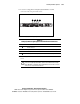
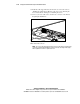
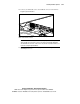
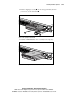
3. Insert the end of the shipping/ejector key into the CD-ROM/diskette
drive assembly ejector port, located immediately below the
Power On/Off switch on the server front panel.