
ProLiant DL320 Setup and Installation Guide

Installing Hardware Options 3-27
Compaq Confidential – Need to Know Required
Writer: Gilbert Saldivar Project: Compaq ProLiant DL320 Setup and Installation Guide Comments:
Part Number: 203836-001 File Name: d-ch3 Installing Hardware Options.doc Last Saved On: 8/23/00 4:00 PM
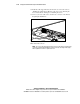
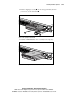
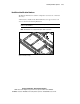
16. Connect your LAN cable to the external RJ-45 connector on the Remote
Insight Lights-Out Edition.
Figure 3-23. Connecting the LAN cable to the Remote Insight Lights-Out
Edition external RJ-45 connector
IMPORTANT: To allow LAN access to the Remote Insight Lights-Out Edition, you must
attach the LAN cable to the RJ-45 connector on the Remote Insight Lights-Out Edition.
The standard RJ-45 connectors on the server’s rear panel do not provide network access
to the Remote Insight Lights-Out Edition.
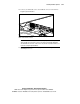
17. Power up the server. See “Powering Up the Server” in Chapter 4,
“Installing the Server.”