
ProLiant DL320 Setup and Installation Guide

3-26 Compaq ProLiant DL320 Setup and Installation Guide
Compaq Confidential – Need to Know Required
Writer: Gilbert Saldivar Project: Compaq ProLiant DL320 Setup and Installation Guide Comments:
Part Number: 203836-001 File Name: d-ch3 Installing Hardware Options.doc Last Saved On: 8/23/00 4:00 PM
14. Install the cable support bracket and insert the server into the rack. See
“Installing the Cable Support Bracket on the Server” and “Inserting the
Server into the Rack” in Chapter 4, “Installing the Server.”
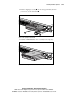
15. Connect your video cable to the external video connector on the Remote
Insight Lights-Out Edition.
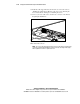
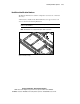
Figure 3-22. Connecting the video cable to the Remote Insight Lights-Out
Edition external video connector
NOTE: The server’s high-density design may prevent some video plugs from fully seating
on the Remote Insight Lights-Out Edition. However, the design does support video plugs
with a height that is less than or equal to 0.62 inch.