
ProLiant DL320 Setup and Installation Guide

Installing Hardware Options 3-25
Compaq Confidential – Need to Know Required
Writer: Gilbert Saldivar Project: Compaq ProLiant DL320 Setup and Installation Guide Comments:
Part Number: 203836-001 File Name: d-ch3 Installing Hardware Options.doc Last Saved On: 8/23/00 4:00 PM
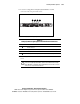
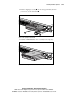
12. Locate the Compaq Remote Insight Lights-Out Edition external
connectors on the rear panel of the server.
1
4
2
3
Figure 3-21. Compaq Remote Insight Lights-Out Edition external connectors
Table 3-5
Compaq Remote Insight Lights-Out Edition External Connectors
Location Connector
RJ-45 connector
Keyboard/mouse connector (not used with ProLiant DL320 servers)
Video connector
AC adapter connector (not used with ProLiant DL320 servers)
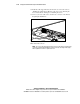
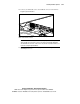
13. Disconnect your video cable from the video connector on the rear of the
server.
CAUTION: Always connect your video cable to the external video connector on
the Remote Insight Lights-Out Edition expansion board. When Remote Insight
Lights-Out Edition is installed in the ProLiant DL320 server, the video connector
on the server’s rear panel will not function.