
ProLiant DL320 Setup and Installation Guide

3-22 Compaq ProLiant DL320 Setup and Installation Guide
Compaq Confidential – Need to Know Required
Writer: Gilbert Saldivar Project: Compaq ProLiant DL320 Setup and Installation Guide Comments:
Part Number: 203836-001 File Name: d-ch3 Installing Hardware Options.doc Last Saved On: 8/23/00 4:00 PM
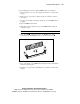
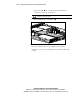
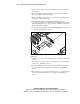
c. Press down firmly above the 64-bit expansion slot until the
assembly is seated in the expansion slot.
CAUTION: The ProLiant DL320 server does not power up if your PCI riser board
assembly is not properly seated.
d. Tighten the PCI riser board thumbscrew .
1
2
Figure 3-19. Installing the PCI riser board assembly
7. Attach any cabling required for operating the expansion board.
8. Install the access panel. See “Installing the Access Panel” earlier in this
chapter.