
ProLiant DL320 Setup and Installation Guide

Installing Hardware Options 3-19
Compaq Confidential – Need to Know Required
Writer: Gilbert Saldivar Project: Compaq ProLiant DL320 Setup and Installation Guide Comments:
Part Number: 203836-001 File Name: d-ch3 Installing Hardware Options.doc Last Saved On: 8/23/00 4:00 PM
Removing the Expansion Slot Cover
Before installing an expansion board, you must remove the expansion slot
cover to allow the board’s connectors to extend from the rear of the server.
CAUTION: Do not operate the server unless an expansion board or expansion
slot cover is installed in the slot. Failure to do so results in improper cooling that
can lead to thermal damage.
Use the following procedure to remove the expansion slot cover:
1. Power down the server. See “Powering Down the Server” earlier in this
chapter.
2. Remove the access panel. See “Removing the Access Panel” earlier in
this chapter.
3. Remove the PCI riser board assembly. See “Removing the PCI Riser
Board Assembly” earlier in this chapter.
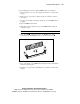
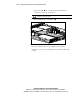
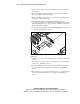
4. Remove the expansion slot cover by pressing outward in its inner face,
as illustrated below.
Figure 3-16. Removing the expansion slot cover
CAUTION: Do not discard the expansion slot cover. If you decide to remove your
PCI expansion board in the future, you must install the expansion slot cover to
maintain proper cooling.