
ProLiant DL320 Setup and Installation Guide

Installing Hardware Options 3-17
Compaq Confidential – Need to Know Required
Writer: Gilbert Saldivar Project: Compaq ProLiant DL320 Setup and Installation Guide Comments:
Part Number: 203836-001 File Name: d-ch3 Installing Hardware Options.doc Last Saved On: 8/23/00 4:00 PM
Use the following procedure to install a DIMM onto the system board:
1. Power down the server. See “Powering Down the Server” earlier in this
chapter.
2. Remove the access panel. See “Removing the Access Panel” earlier in
this chapter.
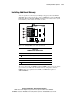
3. Use the previous figure and table to identify the correct DIMM socket to
populate.
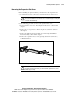
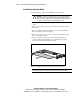
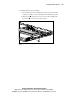
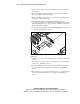
4. Open the DIMM socket latches.
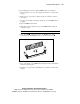
5. Align the key slot in the bottom edge of the DIMM with the tab in the
expansion socket.
IMPORTANT: Misaligned DIMMs do not seat.
6. Insert the DIMM at the same angle as the DIMM socket on the
system board. As the DIMM enters the socket, the latches close
.
2
2
1
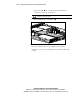
Figure 3-14. Aligning DIMM in a memory expansion socket
7. Press down firmly on the DIMM while pushing the latches inward until
the latches snap into place.
8. Install the access panel. See “Installing the Access Panel” earlier in this
chapter.