
ProLiant DL320 Setup and Installation Guide

Installing Hardware Options 3-15
Compaq Confidential – Need to Know Required
Writer: Gilbert Saldivar Project: Compaq ProLiant DL320 Setup and Installation Guide Comments:
Part Number: 203836-001 File Name: d-ch3 Installing Hardware Options.doc Last Saved On: 8/23/00 4:00 PM
Installing Additional Memory
You can expand server memory by installing Compaq Synchronous DRAM
(SDRAM). The system supports up to four 133-MHz ECC registered SDRAM
Dual Inline Memory Modules (DIMMs) installed in four sockets on the system
board. Memory can be added one module at a time.
4
1
2
3
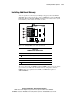
Figure 3-13. Identifying DIMM sockets on the system board
Table 3-2
DIMM Socket Identification
Location Description
DIMM socket 1 (populated)
DIMM socket 2
DIMM socket 3
DIMM socket 4
The server ships with one DIMM installed in DIMM socket 1. You can expand
server memory to 2 GB. In the maximum memory configuration, all four
DIMM sockets are populated with 512-MB, 133-MHz ECC registered
SDRAM DIMMs.