
ProLiant DL320 Setup and Installation Guide

Installing Hardware Options 3-13
Compaq Confidential – Need to Know Required
Writer: Gilbert Saldivar Project: Compaq ProLiant DL320 Setup and Installation Guide Comments:
Part Number: 203836-001 File Name: d-ch3 Installing Hardware Options.doc Last Saved On: 8/23/00 4:00 PM
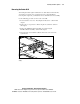
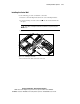
Installing the Center Wall
Use the following procedure to install the center wall.
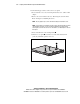
1. Insert the center wall alignment tab into the center wall alignment slot.
2. Lower the locking end of the center wall into the chassis until it locks
into place.
CAUTION: When lowering and locking the center wall, do not pinch any of the
drive cables connecting the front drive area with the rear system and power
areas.
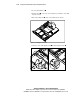
3. Tighten the thumbscrew .
1
2
Figure 3-11. Installing the center wall
4. Reconnect the fan cables to the fan connectors.