
ProLiant DL320 Setup and Installation Guide

Installing Hardware Options 3-7
Compaq Confidential – Need to Know Required
Writer: Gilbert Saldivar Project: Compaq ProLiant DL320 Setup and Installation Guide Comments:
Part Number: 203836-001 File Name: d-ch3 Installing Hardware Options.doc Last Saved On: 8/23/00 4:00 PM
Removing the Shipping/Ejector Key
The ProLiant DL320 server includes a shipping/ejector key that secures either
the CD-ROM/diskette drive assembly or the bezel blank during shipping. This
key should be removed before server deployment. It is also used to eject the
assembly or the blank.
Use the following procedure to remove the shipping/ejector key:
1. Power down the server. See “Powering Down the Server” earlier in this
chapter.
2. Remove the access panel. See “Removing the Access Panel” earlier in
this chapter.
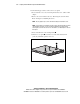
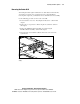
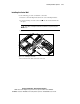
3. Identify and lift the key from its storage location.
Figure 3-4. Removing the shipping/ejector key
4. Install the access panel. See “Installing the Access Panel” later in this
chapter.
CAUTION: Always install the shipping/ejector key in its storage location inside
the chassis before shipping the server. Failure to do so can result in damage to
the CD-ROM/diskette drive assembly.
If you intend to use the CD-ROM/diskette drive assembly ejection feature
frequently, leave the shipping/ejector key in the ejector port for easy access.
Otherwise, store the shipping/ejector key for future use.