
ProLiant DL320 Setup and Installation Guide

3-6 Compaq ProLiant DL320 Setup and Installation Guide
Compaq Confidential – Need to Know Required
Writer: Gilbert Saldivar Project: Compaq ProLiant DL320 Setup and Installation Guide Comments:
Part Number: 203836-001 File Name: d-ch3 Installing Hardware Options.doc Last Saved On: 8/23/00 4:00 PM
Use the following procedure to remove the access panel:
1. Power down the server. See “Powering Down the Server” earlier in this
chapter.
2. Remove the server from the rack. See “Removing the Server from the
Rack” in Chapter 4, “Installing the Server.”
NOTE: This step applies only to servers that have already been mounted in a rack.
NOTE: If you install the rack management solution option (ball-bearing slide rails and a
cable management system), you can perform many hardware procedures without
removing the server from the rack. For more information, see “Other Options” earlier in
this chapter.
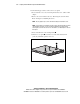
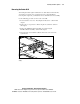
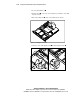
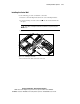
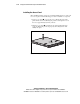
3. Press and hold down on the locking latches .
4. Slide the access panel toward the rear of the unit about 0.5 inch
(1.25 cm), and lift the panel to remove it.
1
1
2
Figure 3-3. Pressing the locking latches and removing the access panel