
ProLiant DL320 Setup and Installation Guide

G-2 Compaq ProLiant DL320 Setup and Installation Guide
Compaq Confidential – Need to Know Required
Writer: Gilbert Saldivar Project: Compaq ProLiant DL320 Setup and Installation Guide Comments:
Part Number: 203836-001 File Name: o-appg System Battery.doc Last Saved On: 8/1/00 4:00 PM
3. If an expansion board is installed, remove the PCI riser board assembly.
See “Removing the PCI Riser Board Assembly” in Chapter 3,
“Installing Hardware Options.”
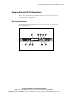
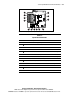
4. Locate the battery holder on the system board.
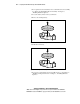
5. Remove the existing battery.
Figure G-1. Removing the old battery
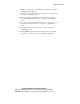
6. Install the new battery.
Figure G-2. Installing the new battery
7. If you removed the PCI riser board assembly in Step 3, reinstall it. See
“Installing an Expansion Board” in Chapter 3, “Installing Hardware
Options.”