
ProLiant DL320 Setup and Installation Guide

E-4 Compaq ProLiant DL320 Setup and Installation Guide
Compaq Confidential – Need to Know Required
Writer: Gilbert Saldivar Project: Compaq ProLiant DL320 Setup and Installation Guide Comments:
Part Number: 203836-001 File Name: m-appe Troubleshooting.doc Last Saved On: 8/23/00 4:21 PM
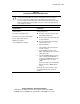
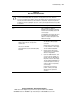
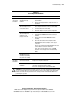
Table E-2
The Front Panel Power On/Off LED is Off.
See “Front Panel LED Indicators” in Appendix D.
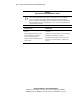
Possible Reasons The Next Step
The system is not connected to AC power, or no
AC power is available.
There is a broken connection between the
backplane and the CD-ROM/diskette drive
assembly.
A power supply problem exists. The power supply
may not be connected properly, may have a
damaged connector, or may have failed.
A cable connection between the system board
and the power supply is broken.
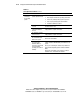
1. Verify AC power connections.
2. Press the Power On/Off switch.
If the server does not start, further information
is needed.
3. Go to Question 1 in Table E-1.