
ProLiant DL320 Setup and Installation Guide

D-12 Compaq ProLiant DL320 Setup and Installation Guide
Compaq Confidential – Need to Know Required
Writer: Gilbert Saldivar Project: Compaq ProLiant DL320 Setup and Installation Guide Comments:
Part Number: 203836-001 File Name: l-appd Status Indicators and Switches.doc Last Saved On: 8/22/00 7:03 PM
Identification Numbers for ATA and SCSI
Hard Drives
The ProLiant DL320 standard configuration consists of two 1-inch hard drive
trays.
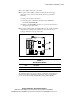
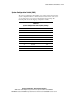
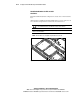
ATA hard drives installed in the ProLiant DL320 server appear as Devices 0
and 1, from left to right when viewed from the front of the server.
CAUTION: When supporting a mixed environment of ATA drives and SCSI drives
in a ProLiant DL320 server, the ATA drive must be the boot device.
IMPORTANT: Always populate hard drive bays starting with the lowest ATA Device
number or SCSI ID number.
NOTE: ATA hard drives are configured using the Cable-Select mode.
0
1
Figure D-5. ATA device numbers or recommended SCSI ID numbers