
ProLiant DL320 Setup and Installation Guide

D-6 Compaq ProLiant DL320 Setup and Installation Guide
Compaq Confidential – Need to Know Required
Writer: Gilbert Saldivar Project: Compaq ProLiant DL320 Setup and Installation Guide Comments:
Part Number: 203836-001 File Name: l-appd Status Indicators and Switches.doc Last Saved On: 8/22/00 7:03 PM
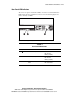
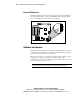
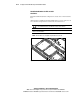
System Switch (SW2)
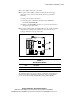
The system switch (SW2) is a four-position switch used for performing
recovery and other diagnostic operations. Refer to the labels attached to the
inside of the server access panel for the proper system switch settings. The
following table shows the shipping configuration of SW2.
CAUTION: Clearing CMOS or nonvolatile RAM (NVRAM) deletes your
configuration information. See Chapter 6 for complete instructions on
configuring your server.
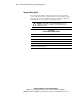
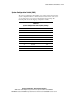
Table D-4
System Switch (SW2) Settings
Switch Position Function Default Position
S1 Clear password Off
S2 Clear CMOS Off
S3 Recovery mode Off
S4 Reserved Off
Note: “On” activates the function.