
ProLiant DL320 Setup and Installation Guide

Status Indicators and Switches D-5
Compaq Confidential – Need to Know Required
Writer: Gilbert Saldivar Project: Compaq ProLiant DL320 Setup and Installation Guide Comments:
Part Number: 203836-001 File Name: l-appd Status Indicators and Switches.doc Last Saved On: 8/22/00 7:03 PM
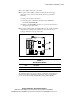
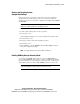
This section explains how to use each switch.
■ The system switch (SW2) contains one switch for use by Compaq
authorized service providers only and may be used to perform the
following:
G Clear power-up and set passwords
G Clear all system configuration information from CMOS and
nonvolatile RAM (NVRAM)
G Enable or disable ROMPaq disaster recovery mode (also known as
emergency repair boot mode)
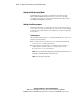
■ The system configuration switch (SW3) allows you to enable or disable
integrated video, though some switches are reserved for the use of
Compaq authorized service providers only.
2
1
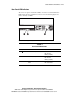
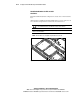
Figure D-4. Locating the system board switches
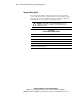
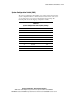
Table D-3
System Board Switches
Item Description
System switch (SW2)
System configuration switch (SW3)
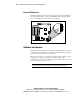
The following subsections provide reference information about setting the
system board switches and jumpers, which is part of the reconfiguration
process, along with running the ROM-Based Setup Utility (RBSU).